
Explore the AI Puzzle & Activity Book Creator Kit. Use AI prompts for puzzle books to plan, design, and review your own printable puzzle and activity books.
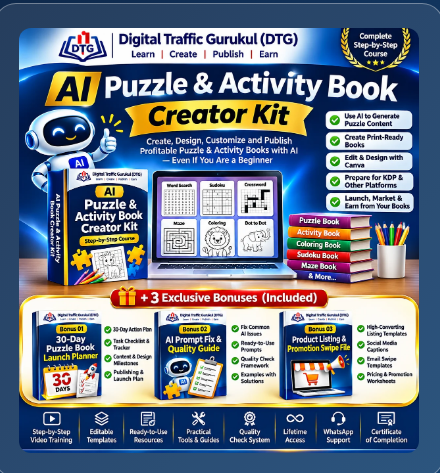
- A puzzle book starts to come together when you can answer three questions. Who will solve it? What will they do on each page? How will you know every answer is right? The AI Puzzle & Activity Book Creator Kit gives creators a workflow for answering those questions before they format a full book.
- This review looks at what the kit includes, where its prompts and templates can save setup time, and which parts of the work still need your judgement. A space-themed activity book shows how the process works in practice.
1. What Is the AI Puzzle & Activity Book Creator Kit?
- The kit is a digital resource for planning, drafting and reviewing printable puzzle and activity books. It combines original puzzles, answer keys, AI prompts, editable Canva templates and written guidance. You can use it to organise a book from the first concept through the final review.
- Its workflow has three stages. First, decide who the book is for and what activities belong in it. Next, use the examples and prompts to develop pages. Finally, solve the puzzles, check the answer keys and review the formatted file.
2. Who Is the Kit Best Suited For?
- Beginners and self-publishers can use the written guidance to work through a manageable sample before committing to a full book. A few well-tested pages are enough to find out whether the difficulty and layout suit the intended audience.
- Teachers and educators can develop themed practice sheets around a vocabulary list or learning objective. Freelancers and digital product creators can use the same process to plan client projects or assemble coordinated printable collections.
3. What’s Included in the Creator Kit?
- Examples and solutions. The kit includes 50 original puzzles and answer keys. Reviewing an example alongside its solution lets you see how the page directions, puzzle and answer key connect.
- Drafting and design resources. You get 100 AI prompts, editable Canva templates and eight written tutorials. The creator guide, publishing guide, licence and quality-check materials support the work from planning to final review.
- Available formats. The kit materials are supplied across PDF, editable Canva and DOCX formats. Start with the creator guide, then open a puzzle and its answer key before adapting a template.
4. How to Choose a Puzzle Book Niche and Audience
- Give your niche both a subject and a reader. “Space puzzles” is broad. “Space puzzles for children who are just learning to solve word searches” gives you a reason to choose familiar words, short directions and a readable grid.
- Think about where readers are most likely to use your puzzle book. . A teacher may need a page that students can finish before the next lesson starts. A parent may want a mix of short and longer activities for a trip. That setting helps you decide how much to put on each page.
5. How to Plan Your Theme, Activity Mix and Difficulty Levels
- A space-themed word search and a planet maze can share an audience without sharing a difficulty level. Start with an activity readers can understand quickly, then introduce more challenging pages once they are familiar with the book’s format.
- Make a simple page plan. List the activity type, page title, difficulty and answer-key reference for each puzzle. For a space sample, try a short planet word search, a maze that leads a rover back to base and a clue activity about objects in the night sky.
6. How to Use AI Prompts for Puzzle Books
- If you’re wondering how to create a puzzle book with AI, start by asking for material you can verify. Give the tool your theme, audience, puzzle type and constraints. For example, ask for twelve familiar space words, each between three and eight letters, and request a short definition for each.
- Use AI prompts for puzzle books to brainstorm themes, draft clues, simplify instructions or suggest variations at different difficulty levels. Check every suggestion before using it. A clue can sound natural and still point to two possible answers.
7. Puzzle and Activity Book Ideas to Try
- Classroom vocabulary pack. Build a word search, clue-matching exercise and short review sheet around the same lesson. Repeating key words across different activities gives students more than one way to practise.
- Travel activity booklet. Combine short word games, mazes and observation activities that readers can do in any order. Put the instructions on each page so it can also work as a standalone printable.
- Themed logic collection. Use a setting such as a garden, space station or animal shelter. Start with a worked example, then gradually add clues or conditions as readers gain confidence.
8. How to Use the Editable Canva Templates
- Choose a template that leaves enough room for your puzzle and the reader’s work. A word search needs a legible grid and a visible word list. A written activity may need more room for answers. Fit the layout to the task before adding decorative elements.
- Set the page size, heading style and instruction placement early. Duplicate the page once those choices work. Use the same structure for similar activities so readers know where to find directions and where to write.
9. How to Check Puzzle Instructions and Answer Keys
- Solve the page you actually exported, with the answer key closed. For a word search, find every listed word and verify that its direction is allowed by the instructions. For a maze, trace the full route from start to finish and look for breaks or accidental shortcuts.
- Compare your result with the answer key. Confirm that page numbers, puzzle titles and solutions still match after edits. If possible, ask someone unfamiliar with the draft to try one page. Notice where they pause or interpret an instruction differently from what you intended.
10. How to Format and Review a Printable Puzzle Book PDF
- Open the exported PDF separately from the design editor. Check page order, margins, grid alignment, text size and the spacing around each answer area. A clue that works in a spreadsheet can still wrap awkwardly on a printed page.
- Print a representative puzzle and its solution at the intended size. Check whether a reader can circle letters, follow a maze with a pencil or write a full answer comfortably. Make corrections in the editable file, then export again and review the revised pages.
11. What to Know About Licensing and Publishing
- Check the kit’s licence for the terms that apply to personal or commercial projects. If you plan to sell a finished book, look specifically at the terms for using included puzzles, adapting templates and distributing editable source files.
- Before releasing a book, consult your chosen platform’s current file and content requirements. Keep a copy of the editable project, the final PDF and the corresponding answer key so you can trace and correct any issue a reader reports.
12. Frequently Asked Questions About the Creator Kit
- Can I use the kit for my first puzzle book? Yes. Start with one audience, one theme and a short sample. Work through the instructions and answer key before expanding the project.
- Does the kit include automatic puzzle generators? It includes original puzzle examples, prompts and templates. Those resources support an AI-assisted workflow in which you build and verify each activity.
- Can I adapt the AI prompts for different themes? Yes. Change the subject, vocabulary, difficulty and output requirements. Then check the new material against your audience and puzzle rules.
13. Final Verdict on the AI Puzzle & Activity Book Creator Kit
- The kit is best suited to creators who want a repeatable process for developing themed activities. Its combination of puzzle examples, solutions and editable layouts is particularly helpful if you have ideas but struggle to turn them into a consistent set of pages.
- Budget time for solving, editing and test printing. The prompts can help you develop ideas and the templates can simplify layout, while accuracy depends on reviewing the pages your readers will actually receive.
14. Affiliate Disclosure
I created the AI Puzzle & Activity Book Creator Kit and may earn revenue from purchases made through the product link below.
Pick a theme, draft three activities and test one printed page. If you want prompts, examples and editable layouts to guide that first project,
Explore the AI Puzzle & Activity Book Creator Kit.
#AIPuzzleBookCreatorKit#PuzzleBookCreation#AIPromptsForPuzzleBooks#PrintablePuzzleBooks#ActivityBookCreator#PrintableActivities#CanvaPuzzleTemplates#PuzzleBookPublishing#