
Explore the AI Lead Magnet & Mini-Ebook Creator Kit with AI lead magnet templates and editable mini-eBooks templates to create, publish, and promote a PDF.
✅ 1. What Is the AI Lead Magnet & Mini-Ebook Creator Kit?
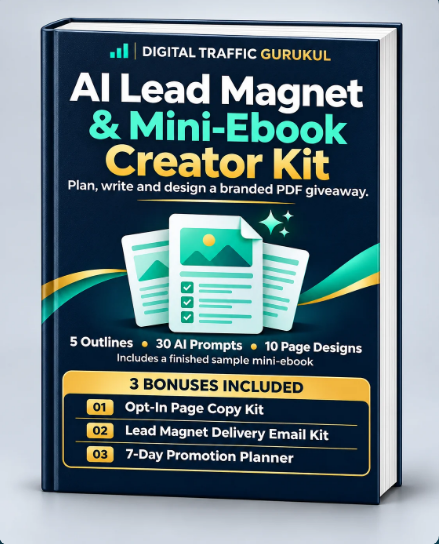
- The AI Lead Magnet & Mini-Ebook Creator Kit is a collection of editable outlines, AI writing prompts, PowerPoint layouts, and publishing resources for creating downloadable content. A lead magnet is a free resource, such as a checklist or mini-ebook, that readers can request by signing up for your email list.
- The kit covers the work around the PDF as well as the PDF itself. You can start with an outline, draft and design the resource, then use the included copy materials to prepare a sign-up page and delivery email. That makes it particularly suitable for creators who have an idea and need a clear order for getting it ready to share.
✅ 2. Who Can Use This Kit to Grow an Email List?
- Course creators and coaches can give prospective students a starter exercise or checklist tied to a paid program. An accounting trainer, for example, could offer a one-page checklist on preparing for a first bookkeeping interview.
- Freelancers and consultants can turn recurring client questions into a short guide. A social media consultant could share a workbook that helps local business owners plan their first week of posts.
- Small businesses and bloggers can offer a resource linked to a specific service or topic. The strongest fit is an audience with a clear problem you can help solve in a few pages. You’ll need a sign-up form and an email service to collect subscribers and send the download.
✅ 3. What’s Included in the Kit?
- A Quick-Start Guide and five editable outlines help you choose a format and see which file to use at each stage.
- Thirty AI prompts cover audience research, topic selection, outlining, drafting, editing, and calls to action. You can supply your own audience details, examples, and tone to guide the output.
- Ten editable PowerPoint page designs and a finished eight-page sample support the design stage. The layouts include two cover options and eight interior page designs.
- A Publishing Checklist and three bonuses help you prepare the opt-in page, write the delivery email, and plan a week of promotion. These materials are especially relevant if you have a finished resource and are unsure how to get it into readers’ hands.
✅ 4. How to Create a Lead Magnet With AI
- Define the result. Complete this sentence before you open an AI tool. “By the end of this resource, my reader will be able to ___.” For example, “plan five social media posts for a local business” gives you a concrete outcome to build around.
- Generate an outline and draft one section at a time. Give the AI your reader’s skill level, the format, and the action you want the reader to take. Add your own examples and verify factual claims before designing the PDF.
- Prepare the sign-up and delivery steps. Export the PDF, connect the opt-in form to your email service, and submit a test sign-up. Check the experience from the reader’s perspective, from entering an email address to opening the file.
✅ 5. How to Choose a Lead Magnet Topic Your Audience Wants
- Look at questions people already ask in consultations, support messages, comments, or workshops. A recurring question gives you a concrete starting point. For example, “What should I post when I have no new products?” could become Five Social Media Post Ideas for Quiet Sales Weeks.
- Check whether the reader can act on the topic soon after downloading it. A short resource works well when it helps someone make a decision, prepare for a task, or complete a first step. Tie that outcome to a service, course, or subject you plan to write about in future emails.
✅ 6. Five Editable AI Lead Magnet Templates and When to Use Each One
- Quick-start guide. Use it to help a beginner complete an unfamiliar task, such as setting up a simple content calendar.
- Checklist. Use it when readers need to review or prepare something in order, such as the items to verify before publishing a product listing.
- Workbook. Choose it when readers benefit from writing down answers, comparing options, or making a plan they can refer to later.
- Resource guide. Group useful tools, references, or examples by task. Explain when each resource helps so readers can choose quickly.
- How-to mini-ebook. Use it when the topic needs several connected steps and enough space for a worked example. This format suits a practical subject such as planning a week of social media content.
✅ 7. How to Use 30 AI Prompts to Research, Draft, and Edit Your Content
- The prompts cover six stages, from researching your audience to writing a call to action. Add real context before running a prompt, such as the exact question clients ask, what they have already tried, and which examples make sense for their business.
- Give the editing stage its own pass. Ask AI to flag vague instructions, repeated points, and terms a beginner may find confusing. Then review the changes yourself. A useful test is to hand one section to someone who matches your audience and see if they can complete the task using the instructions alone.
✅ 8. How to Design Your PDF With 10 Editable Mini-Ebook Templates in PowerPoint
- The editable mini-ebook templates give you two cover options and eight interior page designs. Choose layouts that suit the content, then apply consistent fonts, colours, and spacing. Give exercises and checklists enough room for readers to use them.
- Editable PowerPoint layouts are a practical fit if you already work in PowerPoint. Before publishing, export a draft PDF and open it on a phone. Check that body text is readable, headings are easy to scan, and links can be tapped comfortably.
✅ 9. Inside the Finished 8-Page Mini-Ebook Sample
- The included example, 7 Days of Social Media Content for Local Businesses, shows how a focused topic can become an eight-page resource. Study how the title sets an expectation and how a seven-day scope gives the reader a clear finish line.
- Use the sample to judge the amount of content your own topic needs. A checklist may work in one or two pages. A guide that includes examples, decisions, and follow-up actions may need more room. Choose the length based on what readers need to complete the task.
✅ 10. How to Export and Publish Your Lead Magnet Using the Publishing Checklist
- Review the final PDF for spelling, brand consistency, working links, and clear instructions. Name the file after the resource so readers can recognise it in their downloads folder.
- After uploading it, open the download link in a private browser window. Submit the sign-up form with a test email address, follow the delivery email, and confirm that the PDF opens with the access permissions a new subscriber will have.
✅ 11. How to Write a Sign-Up Page With the Opt-In Page Copy Kit
- Lead with the outcome readers want. For the sample mini-ebook, a headline such as “Plan a Week of Social Media Posts for Your Local Business” tells visitors what they can accomplish. Under the headline, explain what they receive and who it is for.
- Use a button that describes the next action, such as “Send Me the Free Guide.” Tell readers what emails they can expect after signing up so they can make an informed choice.
✅ 12. How to Deliver Your Free Download With the Delivery Email Kit
- Put the promised resource in the subject line and place the download link near the top of the email. A subject such as “Your 7-Day Social Media Content Guide Is Ready” makes the message easy to recognise in a busy inbox.
- Suggest one action readers can take immediately. For example, ask them to open the guide and pick their first post idea. Save longer explanations for a follow-up email so the download stays easy to find.
✅ 13. How to Promote Your Lead Magnet With the 7-Day Promotion Planner
- Use the planner to vary what you share across the week. Start by introducing the problem your resource solves. Follow with a tip, a short example, or a preview page. Link each post to the same opt-in page so readers know where to get the full resource.
- Review visits and confirmed sign-ups together. If people visit the page but few subscribe, check whether the headline and download description match the promise that brought them there.
✅ 14. Affiliate Disclosure
I created the AI Lead Magnet & Mini-Ebook Creator Kit through Digital Traffic Gurukul. Purchases made through an affiliate’s referral link may earn that affiliate a commission.
Explore the AI Lead Magnet & Mini-Ebook Creator Kit if you have a topic and want editable resources for drafting, designing, and delivering it. Start with one question your audience asks often, choose the outline that fits, and build a download that helps readers take their first step.
#AILeadMagnet#AILeadMagnetTemplates#MiniEbookCreatorKit#EditableMiniEbookTemplates#LeadMagnetCreation#EmailListBuilding#ContentCreationWithAI#DigitalTrafficGurukul#